
Summary
Modern ransomware incidents increasingly demonstrate that encrypting production systems is only part of the attacker’s objective. During recent incident response efforts, we observed threat actors deliberately targeting backup infrastructure to eliminate recovery options and increase operational impact. This blog consolidates practical lessons learned from incident response engagements to explain how backup strategies work in practice, how attackers disrupt recovery, and what organizations should consider when planning restoration activities during a cyber incident.
Threat Actor TTPs Targeting Backup Infrastructure
During a recent DFIR engagement involving a network-wide encryption event associated with INC ransomware, the threat actor directly targeted backup systems to inhibit recovery.
The Attack Vector: The initial breach was facilitated by a Virtual Private Network (VPN) gateway that did not have Multi-Factor Authentication (MFA) enabled. This allowed the threat actor to gain a foothold in the environment using compromised credentials. Once inside, the attacker performed internal reconnaissance to identify critical systems including the backup storage.
The Sabotage: The attacker accessed QNAP NAS devices used for backup storage by logging in with a local administrative account. Because this account was local to the device and not integrated with centralized identity monitoring, the login did not trigger a high-priority alert. Once access was obtained, the threat actor used native administrative tools to remove the storage pools and subsequently reset the configuration and format the volumes.
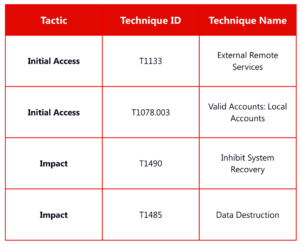
These actions resulted in the complete destruction of available backup data and significantly impacted the organization’s ability to recover. This activity aligns with MITRE ATT&CK T1490 (Inhibit System Recovery). In this case, the attacker did not rely on malware to corrupt backups. Instead, they used legitimate administrative access and native device functionality to erase data, demonstrating how destructive privileged access can be when backup systems are not adequately protected.
Restoration Planning During a Cyber Incident
A critical lesson from this engagement is that restoration must not begin until the threat actor’s access has been fully understood and remediated.
Eradicating Persistence: Before restoring from backup, organizations must identify how the attacker gained access and ensure that access is closed. In this incident, restoring systems without addressing the lack of MFA on the VPN would have allowed the attacker to re-enter and repeat the destruction.
The Role of DFIR in Recovery: Effective restoration requires establishing a clear timeline of the compromise. This timeline provides the reference point for selecting “clean” backups created prior to the initial entry. DFIR plays a critical role here by correlating logs and validating that the selected restoration points do not contain persistence mechanisms such as backdoors, services, scheduled tasks, or web shells.
Recommendations
Lessons from recent engagements highlight specific actions to enhance backup resilience and minimize recovery risk.
1. Identity and Access Control
- Enforce MFA: Multi-factor authentication must be mandatory for all remote access points and administrative consoles.
- Secure Local Accounts: Change factory default passwords and disable unused local administrative accounts on backup appliances like QNAP.
- Decouple Infrastructure: Do not join backup servers to the same Active Directory domain as production systems. This prevents an attacker with domain admin rights from automatically gaining control over the backup environment.
2. Data Architecture
- Implement Immutability: Utilize software and storage solutions that support immutable backups. Once data is written to an immutable cloud bucket or off-site repository, it cannot be deleted or modified for a set duration, even with administrative credentials.
- Follow the 3-2-1-1 Rule: Maintain three copies of data, on two different media types, with one copy off-site and one copy stored in an immutable or offline state (such as tape or air-gapped cloud storage).
3. Operational Readiness
- Use Isolated Recovery Environments (IRE): Restore data into a “clean room” or isolated network segment first. This allows for malware scanning and verification of system integrity before the data is introduced back into the production environment.
- Regular Testing: Conduct scheduled restoration exercises to validate backup integrity and confirm that the recovery team can meet operational timelines.
MITRE ATT&CK Mapping
Closing Thoughts
Cyber incidents expose gaps across access control, monitoring, and restoration planning. The deliberate destruction of backups demonstrates that attackers are prioritizing the removal of recovery options to increase pressure on victims. Organizations that treat backup systems as critical, isolated infrastructure and integrate forensic findings into their restoration decisions are significantly better positioned to recover effectively. Contact an expert today and protect your organization’s systems!